



The WowUtils addon is our in-game addon for the loot side of WowUtils. It tracks every character's crests, upgrade progress, Sparks, and Great Vault just by playing, shares it across your guild, and shows each candidate's wishlist and sim gain right in the RCLootCouncil voting window.
Install it from CurseForge, play, and check it with /wu in-game.
Install the Addon
Every raider installs it, the same way as any other addon: through the CurseForge app or as a manual download.

The WowUtils addon, by Ironi. Free, currently in beta.
Make sure it is the right one
Search results for "wowutils" on CurseForge also show an unrelated addon. Ours is named exactly wowutils, by Ironi. Use the link above and you cannot miss.
There is nothing to configure. Install it, log in, and it starts tracking your characters on its own.
What You Get
- Loot council with real numbers. When an item drops, the RCLootCouncil voting window gains a WowUtils column showing each candidate's sim gain, and a tooltip with their wishlist priority, notes, crest balances, and upgrade progress for that slot.
- The whole guild's state, shared automatically. After raid boss kills and in the background, everyone running the addon swaps their data, so one person's view covers the roster.
- Data the Warcraft API does not expose. Crest balances, per-slot upgrade progress, real Great Vault offers and picks, Spark counts, and weekly quest completion, flowing back to your group on WowUtils through the bridge.

Raiders see it too: every item on the RCLootCouncil roll window carries a WowUtils button with your own sim gain for that item, once your sim is imported.

Check What It Knows
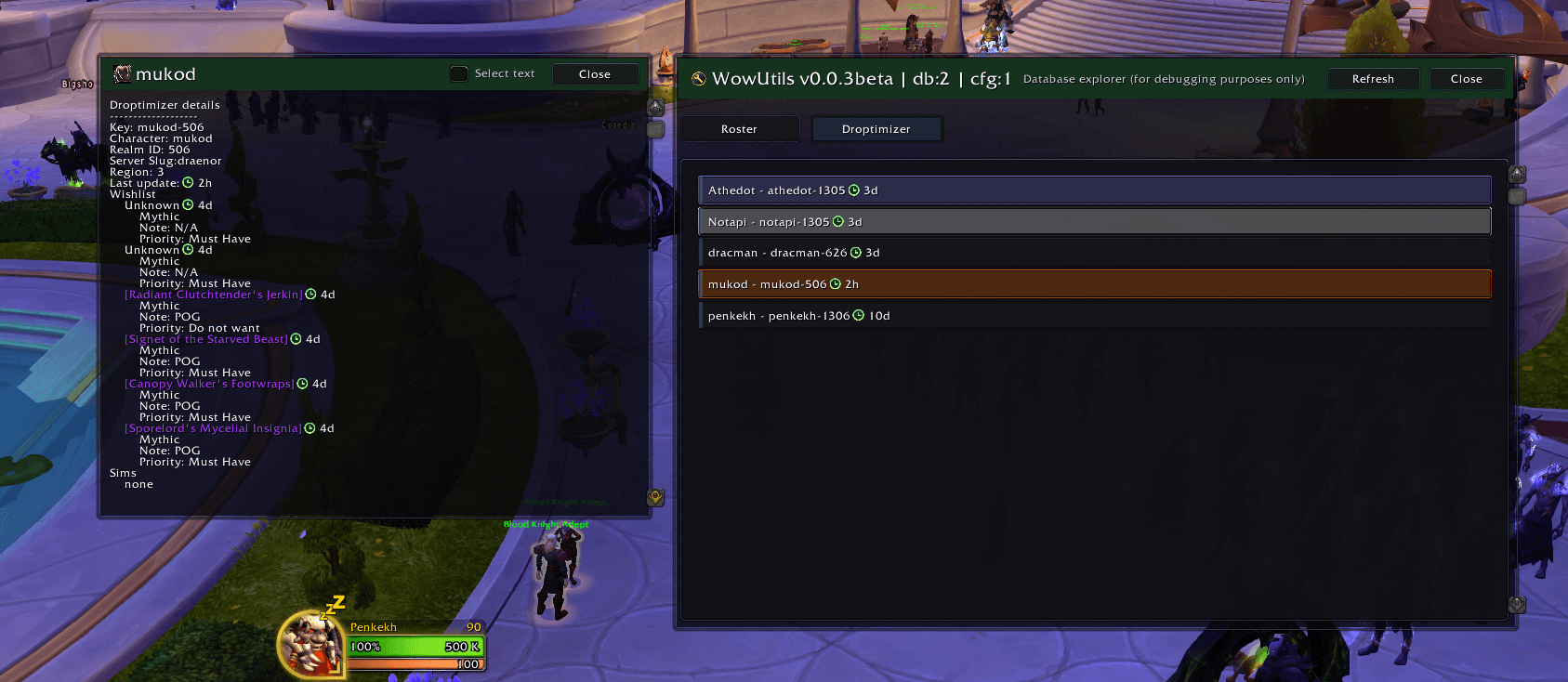
Type /wu (or /wowutils) in-game to open the data explorer. It shows every character the addon knows about, yours and your guildmates', with what was last synced for each: currencies, vault contents, upgrade progress, and imported wishlists and sims.
If a guildmate is missing, they are not running the addon yet, or have not logged in since installing it.

Click any character to open its detail window: currencies with their crest icons, vault contents and picks, upgrade progress per slot, Sparks, and weekly quest completion.

Where the website data comes from
Wishlists and droptimizer sims come from your group on WowUtils, carried into the game by the WowUtils Bridge desktop app. One Owner or Admin per guild runs it; the addon shares what arrives with everyone else in the guild, so nobody else installs anything extra.
Bridge also creates a small data companion addon in that person's game folder automatically. It appears in the addon list as wowutils_data, it is expected, and it needs no attention.
The explorer's Droptimizer tab shows what arrived: every imported wishlist and sim, per character, with priorities and notes.
Support
The addon is in beta, and feedback genuinely shapes it. Bugs, questions, and ideas for the addon or Bridge all go to the Viserio Cooldowns Discord.
See also
- WowUtils Bridge setup - the desktop app that connects the website and the game
- What the addon collects and shares - exactly what data moves, and who sees it
- Loot & Wishlists - build the wishlists the addon shows in-game