



Midnight Content Unlocked
Midnight Cooldowns and Assignment pages are now unlocked for all users! We recommend creating a new Reset for the new raid to start your setups fresh.
Coming Soon: Supporter Cooldown Examples — starter templates for your cooldowns going into week 1. Ready at least 1 week before Midnight Heroic releases. Supporters will get a Discord ping when they're available.
Guide Updates
- New Assignment Planning guide covering reminders, custom reminders, raidstrats embeds, roster sync, view modes, and more
- Cooldown Planning guide updated with a new Creating & Managing section
- Images in all guides are now clickable to zoom in
Generic Actors in Assignments
You can now assign roles, classes, and specs directly in the assignment page — just like on the cooldown page.
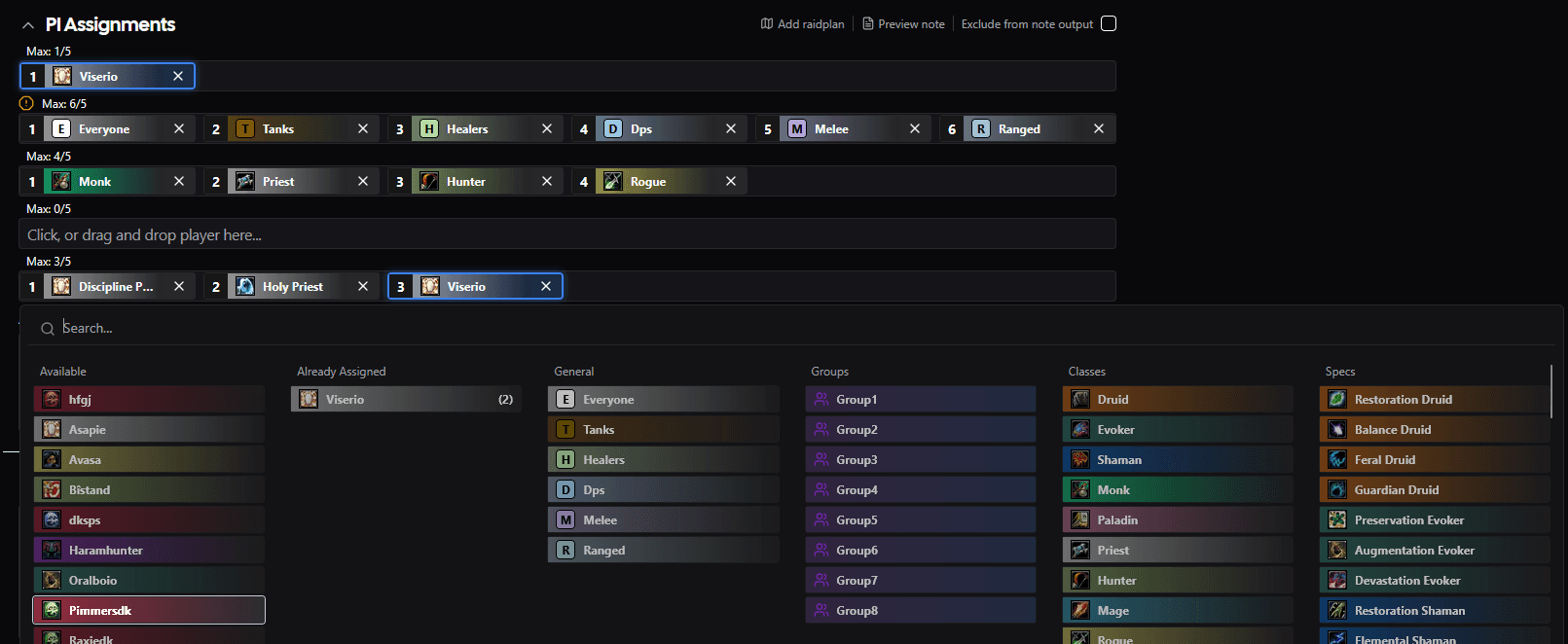
New Selector Columns
The assignment player selector now includes four additional columns:
- General — Everyone, Tanks, Healers, Dps, Melee, Ranged
- Groups — Group1 through Group8
- Classes — All 13 WoW classes with class icons and colors
- Specs — All specializations with spec icons and class colors
Character-Aware Highlighting
When "Highlight My Characters" is enabled, generic actors that match your assigned character are now highlighted too. If your character is a Restoration Druid, then Healers, Ranged, Druid, and Restoration Druid will all light up — making it easy to see which group assignments apply to you.
Player Sheet Support
Generic actors now appear on player sheets as well. If a row assigns "Healers" and you're a healer, the row shows up on your sheet with the highlight — same as a direct player assignment.
Reminder Note Output
Generic actors use proper addon-compatible IDs in NSRT reminder output (e.g. healer, 11 for Druid, 102 for Balance Druid), so your WeakAuras and addons can target them correctly.
Player Sheet Timeline Notes
Notes now appear on the player sheet timeline. Any notes assigned to you — whether by name, role, class, spec, or "Everyone" — show up in a dedicated lane above your cooldowns, so you can see exactly what's expected of you at each point in the fight.