



Raidframe Group Arrangements
You can now pre-configure raid group positions directly from the Setup page. Click the group icon next to the player count on any boss column to open the Group Arrangement dialog.

- Drag and drop players between group slots, or click a slot to pick from a dropdown
- Players not active on the boss setup are highlighted with a red border so you know who needs replacing
When you copy notes from the setup page, the invite list order follows your group arrangement. NSRT uses this to assign raid groups in-game via the Arrange button in /ns reminders.
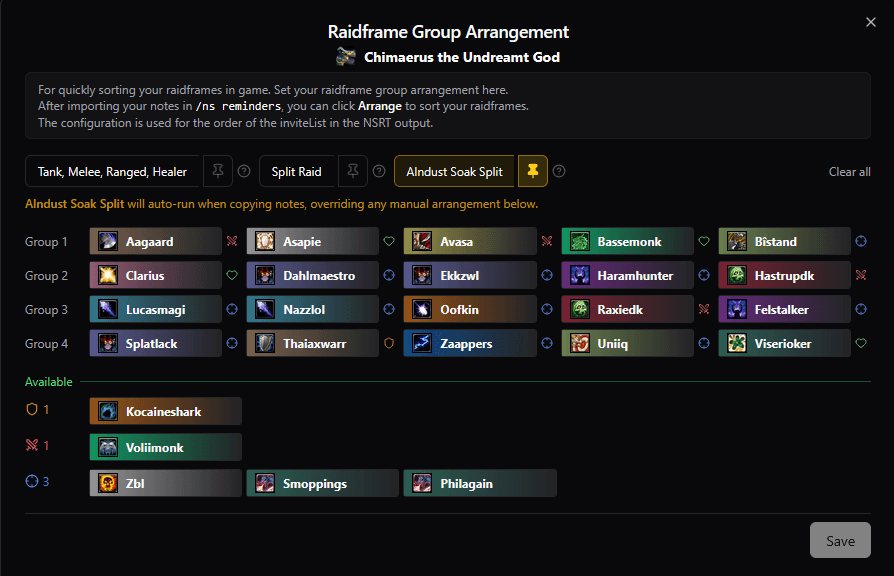
Always Auto-Arrange Groups!
Three built-in sorting options to quickly sort:
- Tank, Melee, Ranged, Healer - fills groups sequentially in role order
- Split Raid - balanced two-way split with role parity and Monk/DK/DH distribution
- Assignment Based Sorting - (e.g., Alndust Soak Split on Chimaerus Mythic) - reads your assignment data and arranges groups based on soak assignments. Soak 1 players go to Groups 1-2, Soak 2 to Groups 3-4.
Pin it to auto-run - (click the pin icon) to auto run it every time you copy notes for that boss. Ensuring your raidframes are always sorted correctly for every boss.
Sim Values on Setup Page
The Setup page now shows droptimizer DPS upgrade values per player on each boss column. Toggle it from the top left of your Setup page — it uses the Loot Wishlist droptimizer data your group has imported.
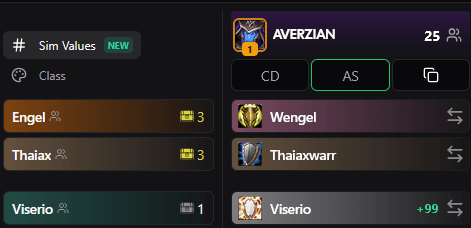
This lets you see at a glance how much each player stands to gain from a boss's loot, helping with bench decisions and loot priority.
Bug Fixes
- PI Reminders — Power Infusion reminder rows no longer generate NSRT output when no timers are configured.
- Player Sheet Raidplan Embeds — Raidplan sections no longer show on assignment blocks that have no raidplan link.
- Filtered Spells Popover — The spell filter dropdown on inactive player timelines no longer renders behind other players.
- Player Names — Fixed issue with odd capitalisation after special unicode characters.
As always, feedback and ideas are welcome in Discord.