



The copy-paste between the web and the game, retired.
WowUtils Bridge is a small app that lives in your system tray, pairs with your WowUtils account, and keeps your team's loot data moving between the site and World of Warcraft on its own, both directions. No import strings, no manual steps, and only one person per guild runs it.
Version 1.1.0 · 12.7 MB · Signed by WowUtils
Windows may warn on a brand-new release. The guide walks you past it in two clicks.
You raid, and someone else runs Bridge? You just want the addon.
The game and the web can't talk to each other.
World of Warcraft cannot fetch anything from a website while you play, and no website can reach into the game. So every tool settles for the same tax: export a string, copy it, paste it in-game, and do it all again every time the plan changes.
Multiply that by a full roster and a whole raid tier, and the copy-paste is a real cost. Worse, it silently goes stale: the moment someone forgets a paste, the game is showing last week's data.
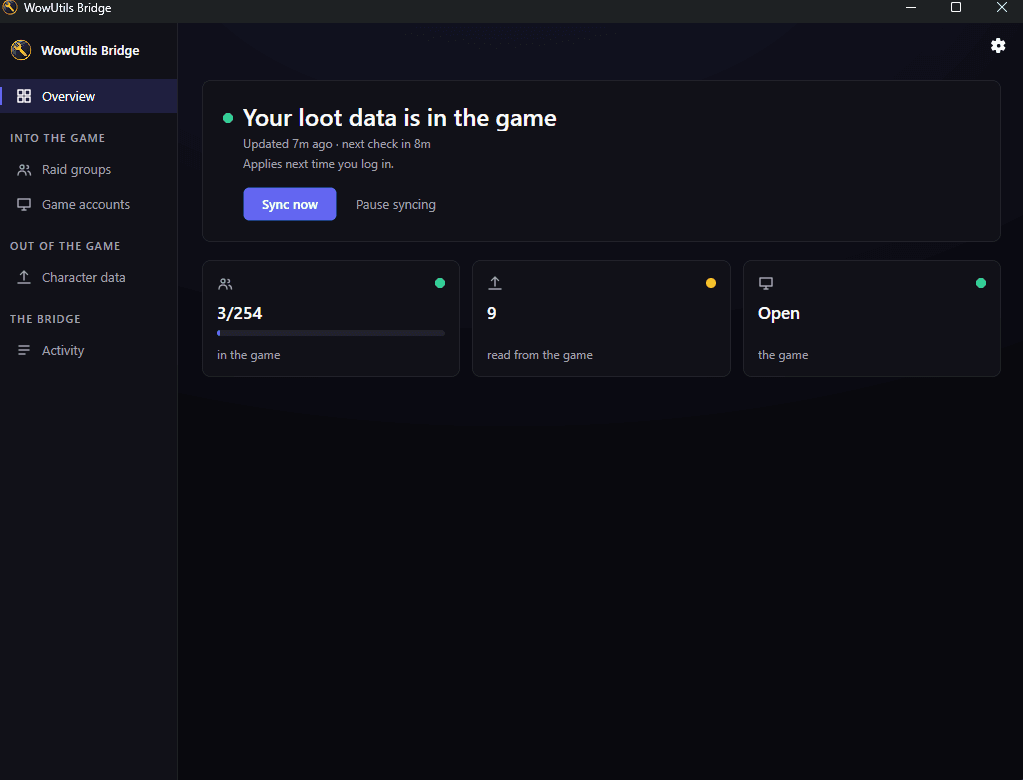
WowUtils Bridge pays that tax for you. It sits between your WowUtils account and your game install and moves the data itself, so what you see in-game is simply current.
How it works
Pair it once
Sign in with your WowUtils account through your own browser and pick your raid teams. That is the whole setup.
It finds your game
Bridge locates your World of Warcraft install by itself. If yours lives somewhere unusual, point it at the folder once and you are done.
Data flows on its own
Press Push to game or let the timer run. Your team's wishlists and sim results are waiting in the game the next time you load in.
What you get
Small, quiet, out of the way
A single lightweight app in your system tray. No launcher, no browser tabs, no window demanding attention. It just does its job in the background.
Wishlists and sims, in-game
The loot wishlists and droptimizer results your team keeps on WowUtils appear inside the game through the WowUtils addon, current without anyone pasting anything.
What the game knows, on the site
Crests, per-slot upgrade watermarks, real Great Vault contents, and Spark counts go back to your group on WowUtils. Blizzard's API reports none of it, so an addon is the only way anyone gets it.
Careful by design
Bridge writes only its own WowUtils data files and never touches the game, your settings, or other addons. Pairing runs through your own browser, so the app never sees your password.
First launch on Windows
If Windows shows a warning
For the first days after each new release, Windows SmartScreen may say “Windows protected your PC” when you run the installer. That is Windows being cautious with a file it has not seen many times yet, and it fades on its own as more people install that release.
- Click More info.
- Check the publisher reads WowUtils.
- Click Run anyway.
Want it with pictures? The setup guide shows both dialogs.
Check what you downloaded
Every release is signed by us. Right-click the installer, open Properties → Digital Signatures, and the publisher should read WowUtils.
If you would rather check the file itself, this is what it should come out as:
SHA-256 d185f54cb8c96e9cc1f68d52337cf7959ab9689ae6fff083290ba7b040d3c8ba
(Get-FileHash .\WowUtilsBridge-1.1.0-win-x64-setup.exe -Algorithm SHA256).Hash
One person runs this. The whole raid sees the result.
Bridge delivers the data; the WowUtils in-game addon reads it and shows it where you play, then hands back what it learned in game for Bridge to carry to your group on the site. Every raider wants that addon, but only one person per guild needs Bridge, because in game the addons pass both directions around the raid themselves.
Read the step-by-step setup guide · See everything your raid installs
Frequently asked
- What is WowUtils Bridge?
- A small desktop app that lives in your system tray and connects your WowUtils account to your World of Warcraft install. It carries your team’s loot wishlists and sim results from the website into the game, and carries what the WowUtils addon learned in game back out to your group, so both sides stay current on their own.
- What does it send back from the game?
- The things only the game client knows: crest and currency balances, how far each gear slot is already upgraded, what the Great Vault actually offered and what was picked, and crafting spark counts. Blizzard’s API does not report any of it. Bridge only ever sends data for characters on a roster of a group you belong to, and only from a paired device.
- Do I still need import strings?
- Not for the data Bridge carries. Today the game and the web cannot talk to each other, so every tool asks you to export a string, copy it, and paste it in-game, again every time something changes. Bridge does that trip for you in the background.
- What platforms does it run on?
- Windows. The app is built on a cross-platform foundation, so other platforms can follow, but Windows is the one it runs on today.
- Does it need the WowUtils addon?
- Yes. Bridge delivers the data to your game folder, and the WowUtils in-game addon reads it and shows it where you play, so every raider wants the addon. It is a free download on CurseForge, and Bridge sets up the small data carrier it writes to by itself. Bridge is different: only one person per guild needs to run it, because the addon shares what it receives with the rest of the raid in game.
- Does everyone in my guild need to install Bridge?
- No. One person is enough. Whoever runs Bridge feeds the data into their game, and the WowUtils addon carries it from there to everyone else who is running the addon. That runner is usually an Owner or Admin of your group on the website.
- Is it safe to let it touch my game folder?
- That concern shaped the whole design. Bridge finds your real World of Warcraft install, writes only its own WowUtils data files, and never modifies the game, your settings, or other addons. Pairing happens through a sign-in page in your own browser, so the app never sees your password.
- Does it update itself?
- Yes. Bridge checks for a new version once a day and installs it quietly in the background, so there is nothing to keep an eye on. It never does that while World of Warcraft is running, so an update can never interrupt a raid night.
- Can I download it yet?
- Yes. Bridge is out for everyone, free, on Windows. Hit Download for Windows at the top of this page, run the installer, and pair it with your WowUtils account through your own browser. It keeps itself current from there.
- Do supporters get more out of the addon or Bridge?
- No. The WowUtils addon and the Bridge desktop app are free, and they work the same for every player. Supporting WowUtils never unlocks anything in the addon or in Bridge, and help in the Discord is the same whether you support us or not. Supporter perks are extras on the website, like browsing past weeks of your team's Great Vault.
- Why does Windows warn me when I run the installer?
- Right after a new release, Windows SmartScreen can show "Windows protected your PC" for a file it has not seen many times yet. Every Bridge release is signed by WowUtils, so click More info, check that the publisher reads WowUtils, and choose Run anyway. The warning fades on its own as more people install that release.
- Where do I get help or report a problem?
- The Viserio Cooldowns Discord is the support home for both Bridge and the WowUtils addon. Something not syncing, a warning you do not trust, a bug after a raid night: post it there and you will get a fast answer.
Part of WoWUtils · Built for raid teams that plan