



Your whole raid's gear picture, straight from the game.
The WowUtils addon tracks each character's crests, currencies, and upgrade progress while you play, then shares it with your guild, so loot decisions start from real data instead of asking around.
Look for wowutils by Ironi. Another addon shows up for the same search on CurseForge and is not related. The install guide walks you through it.
Officers spend raid night asking questions the game could answer.
Who still needs this trinket? How many crests does he have banked? Is that slot already upgraded past the point where the drop matters? Every loot decision leans on answers like these, and today they come from asking in Discord, or a spreadsheet somebody forgot to update.
The frustrating part is that the game already knows all of it. The data just sits locked inside each player's own client, where nobody else can see it.
The WowUtils addon unlocks it. Everyone's crests, currencies, and upgrade progress get collected automatically and shared across the raid, so the answers are simply there when an item drops.
How it works
Install it and play
Grab it from CurseForge and play. The addon picks up your crests, currencies, gear upgrade progress, and crafting sparks on its own, for every character you log. Nothing to fill in.
Kill bosses together
After each boss kill, everyone running the addon shares their data across the raid automatically. No exports, no uploads, no reminders in chat.
Decide loot with the full picture
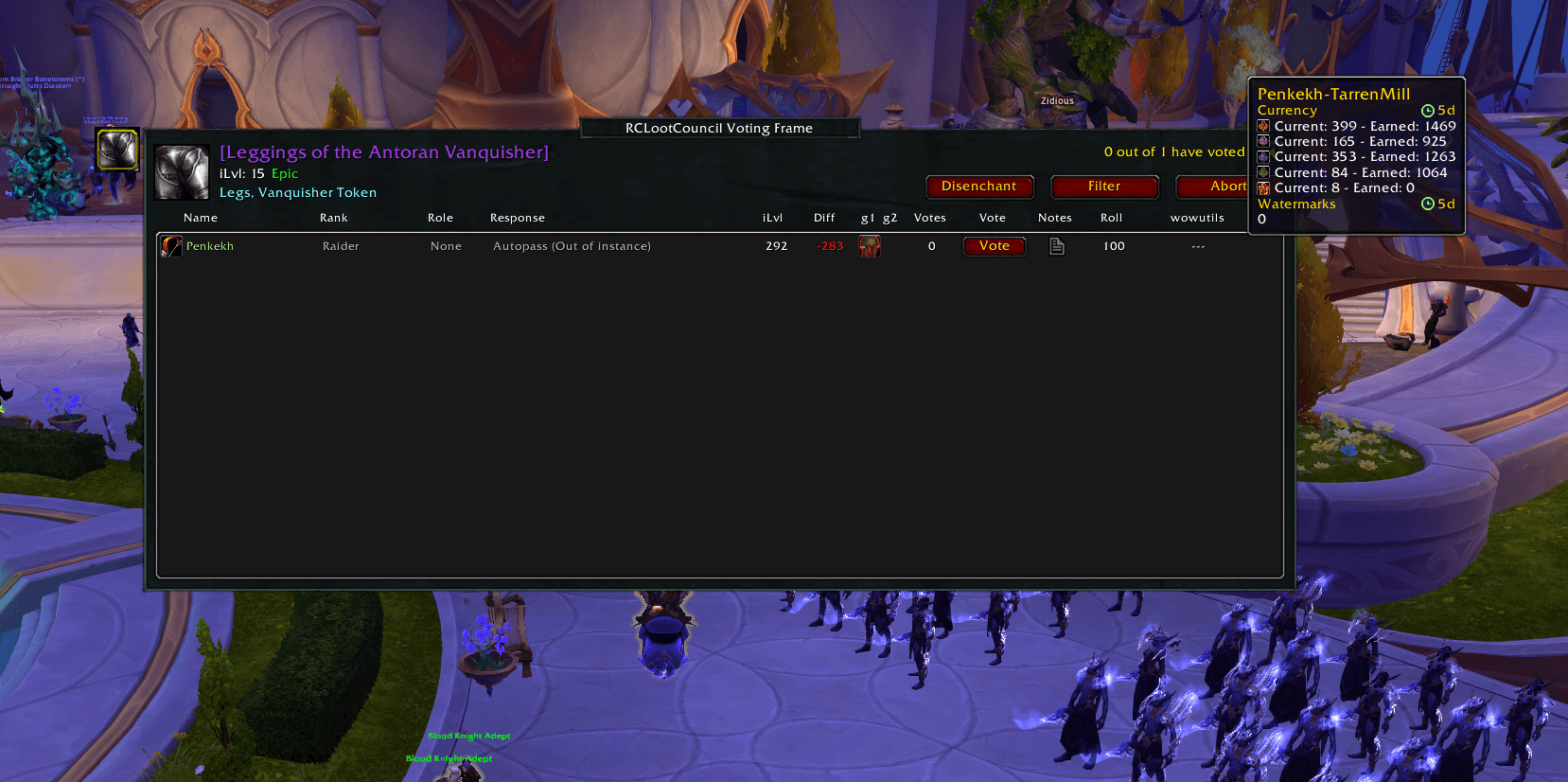
When an item drops, each candidate's numbers are right there in the loot council window, so the item goes where it does the most good.
What the beta brings
Every character, no forms
Crests, currencies, and crafting sparks tracked per character and kept current just by logging in. Alts included, automatically.
Upgrade progress per slot
See how far each gear slot is already upgraded, so it is obvious when a drop is a real upgrade and when it is just a crest dump.
One shared guild picture
Data moves between guildmates in-game after boss kills, and reaches your group on WowUtils too, so officers see the whole roster's state without collecting screenshots or chasing people in Discord.
Built for loot council
A WowUtils column and tooltip inside the RCLootCouncil voting window puts each candidate's crests and upgrade progress next to their vote, right where the decision happens.
Everyone installs the addon. One person feeds it.
The addon is the part every raider installs. Moving data between the website and the game is a separate, one-time job: one person in your guild runs WowUtils Bridge, a small desktop app that carries your team's wishlists and sims into their game folder, and carries what the addon learned back out to your group on WowUtils. In game the addons pass both directions around the raid themselves, so nobody else has to install or run anything extra.
Frequently asked
- What does the WowUtils addon do?
- It runs quietly in-game and keeps track of each of your characters: crest currencies, gear upgrade progress per slot, and crafting sparks. It shares that picture with your guildmates who run the addon, so officers can see the whole roster’s state without asking around, and it puts the numbers in front of your loot council when an item drops.
- Is this the same as the addons my cooldown notes export to?
- No. Northern Sky Raid Tools and Method Raid Tools are third-party addons that display the raid plan you build in Viserio Cooldowns. The WowUtils addon is our own first-party addon, and it does a different job: it collects your characters’ gear and currency data from the game, shares it with your team, and sends it back to your group on WowUtils.
- What does it know that the Warcraft API does not?
- The things that decide loot. Blizzard’s API does not report crest balances, how far each gear slot is already upgraded, what the Great Vault actually offered someone, or how many crafting sparks they are sitting on. Those only exist inside the game client, which is why an addon is the only way to get them. The addon reads them while you play and sends them back to your group.
- Do I have to enter anything by hand?
- No. The addon picks everything up on its own while you play. Log in, kill bosses, and the data stays current. There are no forms, no exports, and nothing to remember before raid.
- Does it work with RCLootCouncil?
- Yes, that is one of the main reasons it exists. In the beta, the RCLootCouncil voting window gains a WowUtils column and tooltip showing each candidate’s crests and upgrade progress, so the council can judge who actually gains from an item without leaving the loot frame.
- Where do I get the WowUtils addon?
- On CurseForge, free, installable with the CurseForge app like any other addon. Make sure it is the one named wowutils, by Ironi: an unrelated addon shows up for the same search. The addon is in beta, so if something looks off, the WowUtils Discord is the place to say so.
- Is the WowUtils addon free?
- Yes. The addon is free, like the core WowUtils toolset it feeds into.
- Do supporters get more out of the addon or Bridge?
- No. The WowUtils addon and the Bridge desktop app are free, and they work the same for every player. Supporting WowUtils never unlocks anything in the addon or in Bridge, and help in the Discord is the same whether you support us or not. Supporter perks are extras on the website, like browsing past weeks of your team's Great Vault.
Part of WoWUtils · Built for raid teams that plan