



The setup screen shows every boss at once. Often you're only working one: a single-boss night, or the pull you're progressing. Now you can drop the planner to just that boss.
Focus one boss at a time
- Focus any boss. Click the focus icon on a boss column, or on a boss portrait in the calendar, and the desktop planner narrows to that fight: Tanks, Healers, Melee, and Ranged columns, each with who's seated and who's benched below.
- Seat and bench with one click. Click a seated name to bench them, a benched name to bring them in. No popup, no drag.
- One-boss nights open straight in. A night with a single boss opens right in that boss's view, and the calendar's button reads "Open tonight's boss." A "Back to grid" link returns to the full setup.

The boss panel
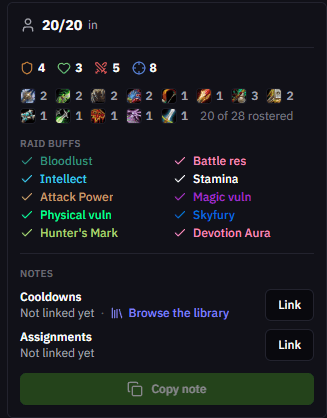
A panel beside the columns sums up the fight, so you're not counting heads.
- Seated count and class spread. Headcount against the cap, the role split, and a per-class tally of the comp.
- Raid-buff coverage. Bloodlust, Battle Res, the Intellect, Stamina and Attack Power buffs, the vulnerability debuffs, Skyfury, Hunter's Mark and the rest, each a check or an X in the class color. Hover to see who brings it.
- Note status and Copy. Whether the cooldown and assignment notes are linked, with a Copy button to push the note to your addon.
- Who's available. Anyone who signed up absent, tentative, standby, or late, plus who's benched from the whole setup, with a click to add them back.
Around the app
- Your row is marked. Claim a roster character and your row gets a You badge with a link to your assignments. On mobile, the per-boss view now shows who's benched too, so you can swap from your phone.
- View-only members can't move players. In the group arrangement tool, view-only access can no longer drag players or save. Editing is limited to members who can edit the reset.
- Sim imports keep catalyst upgrades. Droptimizer imports no longer drop catalyzed items they can't match to a raw drop. They come through tagged as catalyst upgrades.
- Armory links hit the right realm. Character and armory links now resolve for realms whose web address isn't a plain lowercase of the name, like Azjol-Nerub and accented European realms.
As always, feedback and ideas are welcome in Discord.